Cubestow
3D load planning · containers · trucks · pallets

Fit more in every container.

Cubestow works out how your cargo actually loads — respecting stacking limits, fragile items, orientation, payload and delivery order — and hands you a 3D load plan your warehouse can follow.

No signup. Nothing is uploaded — the whole calculation runs on your device. Paste cargo straight from Excel.

Loading the sample shipment…
Sea containers, trailers, box trucks, pallets Stacking, fragile, floor-only, keep-upright rules Multi-stop delivery order (LIFO) Every plan self-validated PDF & Excel load plans
Why load planning

Volume tells you it fits. It doesn't tell you how.

A 20-foot container has 33 m³. Your cargo is 25 m³. Then the pallets can't take weight, the long boxes only go one way, and the last customer's stop has to come out first — and suddenly it's two containers. Cubestow finds the arrangement, not just the arithmetic.

📦

Real constraints, not a volume calculator

Nothing on top of fragile items. Heavy crates on the floor. This-side-up boxes stay upright. Max load per item. Payload limits. Minimum 80% support under every box so nothing floats.

🧭

A plan people can follow

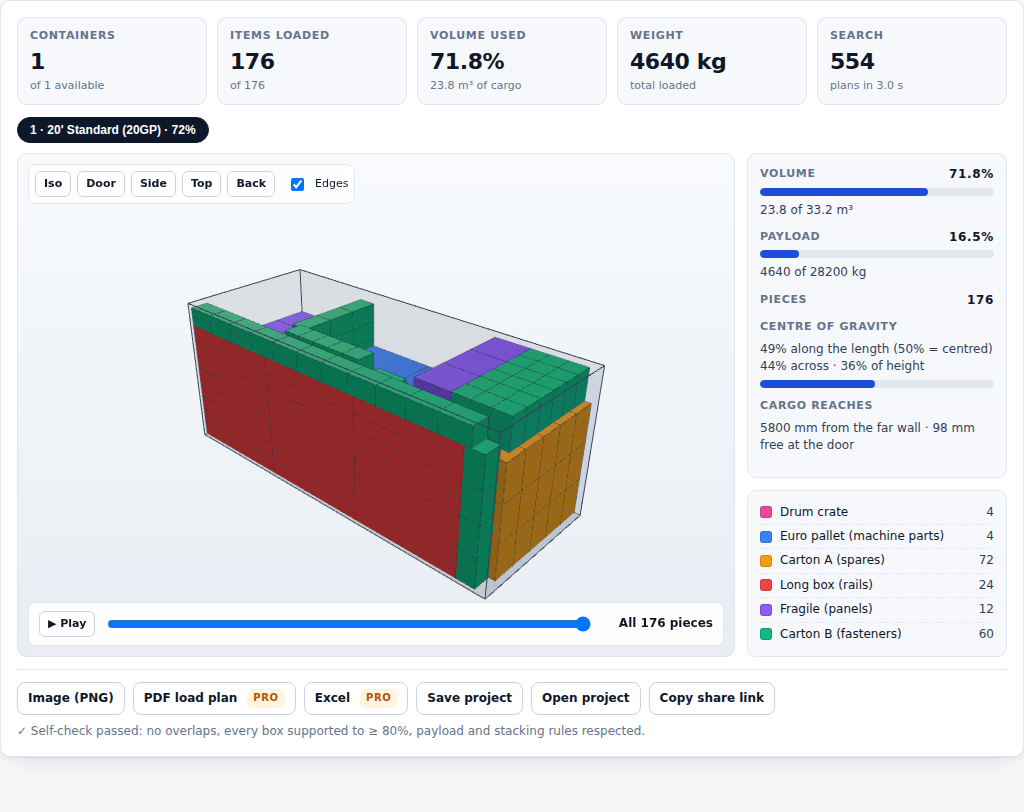
Step-by-step loading sequence from the far wall to the door, grouped into walls of identical cartons. Hover any box to see exactly where it goes. Export a PDF for the dock and an Excel manifest for the office.

⚖️

Weight where it should be

See the centre of gravity along, across and up. Ask the optimiser to prefer a balanced load. Watch payload utilisation and how much floor is left at the door.

How it works

Three steps, about a minute.

1

Pick the container or vehicle

20' and 40' containers, high cubes, reefers, EU and US trailers, box trucks, vans and standard pallets are built in — or type your own inner dimensions.

2

Add your cargo

Type it in, or paste rows straight from Excel: name, dimensions, weight, quantity. Set rotation, stacking and delivery-stop rules per line. mm, cm or inches; kg or lb.

3

Calculate

The engine tries hundreds of loading plans in a few seconds and keeps the best. Explore it in 3D, step through the loading order, then export the plan.

Try it with the sample shipment
Cubestow load plan: 3D view of a 20-foot container with cartons, pallets and long boxes, plus utilisation statistics
Features

Everything a load plan needs. Nothing to install.

Sea containers & trucks20GP, 40GP, 40HC, 45HC, reefers, 13.6 m trailers, 53' vans, box trucks, panel vans, custom.
Pallet buildingPlan a EUR, UK, US or Australian pallet as a "container" with a max stack height.
Wall buildingIdentical cartons are placed as regular blocks — tighter packing and a plan that reads like the real thing.
Stacking rulesStackable / nothing on top / max load per item, plus floor-only for heavy or wheeled cargo.
OrientationAny rotation, keep upright, or fixed — per item.
Multi-stop deliveryGive each line a stop number. Later stops load deeper so the first drop comes out first.
Weight & balancePayload limits, weight-bearing propagation through stacks, centre-of-gravity readout, balance preference.
Minimise containersAsk how few containers a shipment needs and get every one of them planned.
Loading sequencePlay the load box-by-box from the far wall to the door.
ExportsPNG for chat, PDF load plan for the dock, Excel manifest for the office, JSON to reopen later, share links for colleagues.
Self-validationEvery result is independently checked for overlaps, support, stacking, payload and delivery order before you see it.
Private by designRuns entirely in your browser. Your cargo lists never leave your device.
Honest comparison

Professional-grade planning at a small-business price.

Established load-planning tools are excellent — and priced for freight forwarders and manufacturers with a software budget. Most start around US$40 per user per month and run to several thousand dollars a year. Cubestow is built for the exporter, 3PL, e-commerce brand or plant that needs good load plans every week without a procurement process.

Typical desktop / SaaS load plannerCubestow
PriceUS$40–200 per user per month, or US$500–2,500 licencesFree, or Pro at US$12/month · US$89/year
Getting startedTrial signup, install, trainingOpen a web page. Paste your cargo. Calculate.
Where your data goesTheir serversNowhere — it stays in your browser
3D plan, stacking, weight, LIFOYesYes
Axle-load calculation, ULD air containers, ERP integrationSomeNot yet — on the roadmap
Pricing

Start free. Upgrade when you're planning real shipments.

Free

$0 forever
  • One container, truck or pallet per plan
  • Up to 12 item types
  • All stacking, orientation and weight rules
  • 3D viewer & loading sequence
  • PNG image, save/open project, share links
  • Multi-container & minimise-containers mode
  • PDF load plan & Excel manifest
Open the planner

Pro

$89 per year · per user
  • Everything in Free
  • Several containers per plan and minimise-containers mode
  • Unlimited item types, multi-stop delivery sequencing
  • PDF load plans and Excel manifests
  • Up to 30 seconds of optimisation for tighter loads
  • Priority email support
Get Pro — yearly

Secure checkout by Stripe. Your licence key appears the moment payment completes. 14-day money-back guarantee. Prices in USD.

Fit guides

How many fit? 367 questions, each answered by the engine

Every figure is a real load plan computed by the Cubestow engine on typical inner dimensions, re-validated for support, stacking and payload — not a volume division. Each guide has a floor-layout diagram and opens the plan in the 3D planner.

All fit guides →

Questions

Frequently asked

How good are the plans?

Container loading is an NP-hard problem, so every tool — including the expensive ones — uses heuristics. Cubestow's engine combines empty-space placement, wall building and a multi-start search, and typically reaches 85–93% volume utilisation on weakly heterogeneous cargo in a few seconds. Give it more time in Pro and it keeps improving. Every plan is independently validated before it is shown.

Do you support pallets, trucks and air containers?

Pallets (as a footprint with a max stack height), sea containers and trucks/trailers are built in, and any rectangular space works as a custom container. Air ULDs with sloped sides are on the roadmap.

What about cylinders, drums or irregular items?

Enter their bounding box (for a drum: diameter × diameter × height) and mark them floor-only or non-stackable as appropriate.

Where is my data stored?

On your device. Projects autosave to your browser's local storage; "Save project" gives you a file. Nothing is sent to a server — there isn't one. Share links encode your inputs in the link itself.

Which browsers?

Current Chrome, Edge, Firefox and Safari on desktop. It runs on tablets too; the 3D view needs WebGL.

Invoices, VAT, refunds?

Checkout, invoices and card management are handled by Stripe; you can cancel or change your card any time from the billing portal linked on your activation page. Pro comes with a 14-day money-back guarantee — email support and it's done.

Can I use it for my customers as a freight forwarder or 3PL?

Yes. A Pro licence is per user, for unlimited plans and clients. Team licences are coming. The engine is already available to software vendors as Cubestow Core.